
Direct Stream Recorder
3.2
Size: 639 KB
Downloads: 4145
Platform: Windows (All Versions)

Imagine having a conversation on Skype or using a certain application. You may want to recall certain elements of the conversation or the usage of certain application features. In this case, it would be useful if you could record everything displayed on the desktop and save it as a video file. The same goes for viewing an online video which cannot be saved on the hard disk. For all these problems, Direct Stream Recorder is the solution. It's a Windows application which can record everything displayed on the screen, together with sound from different sources, and save it as a regular video file.
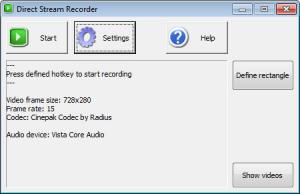
The program weights around 4 MB on the hard disk and features a simple installation wizard. After loading the application, the user should first access the configuration window, for choosing the video codec that will be used for recording, the frame rate and also the audio source. All the video codecs installed into the system can be used together with Direct Stream Recorder. Any kind of audio source is supported by Direct Stream Recorder, including the microphone, line-in or "What u hear." Besides that, the user can choose to have the mouse captured or not.
After making all these adjustments, one can start the recording either by clicking on the Start button or by using a shortcut key. Additionally, he can choose an area of the screen to be recorded and saved as a video file, in case one doesn't need to capture the entire desktop. This will make the video file smaller.
During the recording process, the user can see some real time information about it, like the current duration of the video and file size. At the end of the recording, the folder where the video file was created can be easily opened using a single mouse click.
Pros
It allows capturing the entire desktop or only a portion of it. Besides that, the video codec and the frame rate can be adjusted. What's more, audio can be included inside the recording, supporting sound from different sources, like the microphone and line-in. Furthermore, a shortcut key can be defined for initiating a capturing process. Moreover, some real time information is displayed during the recording process.

Cons
The program cannot capture still desktop images. Direct Stream Recorder can capture the desktop and save it as a video file, together with sound, in the easiest way possible.

Direct Stream Recorder
3.2
Download
Direct Stream Recorder Awards

Direct Stream Recorder Editor’s Review Rating
Direct Stream Recorder has been reviewed by Jerome Johnston on 01 May 2012. Based on the user interface, features and complexity, Findmysoft has rated Direct Stream Recorder 4 out of 5 stars, naming it Excellent







